

close
Choose Your Site
Global
Social Media

Views: 0 Author: Site Editor Publish Time: 2026-07-24 Origin: Site


Do you sit all day at work? Your office chair shapes posture and comfort. A poor chair often causes back pain, neck tension, and fatigue. Many workers notice these problems after long desk hours.
Choosing the right office chair is not always easy. Many models claim ergonomic design, yet few truly support the body. In this article, you will learn how to choose the right ergonomic office chair for your needs.
When sitting for extended periods, the human body relies heavily on back support. The spine has natural curves that must be maintained to avoid excessive pressure on muscles and joints. A poorly designed office chair often lacks proper lumbar support, causing the lower back to collapse into a slouched position. Over time, this posture creates stress in the lumbar region and forces surrounding muscles to compensate.
As fatigue develops, workers tend to lean forward toward the screen or desk. This forward posture shifts the head and shoulders out of alignment with the spine. The result is tension in the neck, shoulders, and upper back. Repeating this pattern daily can lead to chronic discomfort and long-term musculoskeletal issues. Workplace ergonomics studies indicate that inadequate seating is one of the most significant contributors to office-related back pain.
For businesses managing large teams, this issue becomes even more important. A poorly designed seating environment can contribute to reduced employee comfort and increased fatigue. Choosing a supportive office chair therefore becomes part of workplace health management rather than simply furniture selection.
Physical comfort strongly influences mental performance. When the body experiences discomfort, concentration shifts away from tasks and toward managing the discomfort itself. Even minor posture issues can interrupt workflow. Workers frequently adjust their position, stretch, or shift in their seat to relieve pressure.
A well-designed ergonomic office chair helps eliminate these distractions. By supporting the spine and distributing body weight evenly, it reduces physical strain during long periods of sitting. This stability allows employees to remain focused on their work rather than their posture.
Modern workplaces increasingly recognize this relationship between comfort and productivity. Many companies redesign office layouts with ergonomic workstations that combine adjustable desks, monitor arms, and ergonomic chairs. These improvements are not simply aesthetic changes. They help create an environment where employees can work efficiently without physical discomfort interrupting their concentration.
The benefits of ergonomic seating extend beyond daily comfort. Over time, a supportive office chair helps maintain healthy sitting habits. Proper lumbar support keeps the spine aligned, while adjustable seat height encourages proper leg positioning and blood circulation.
Maintaining good posture also reduces pressure on the intervertebral discs of the spine. This is particularly important for individuals who sit more than six hours per day. When posture remains balanced, the body distributes weight more evenly across the hips and thighs rather than concentrating pressure in the lower back.
Companies that implement ergonomic seating often notice improvements in employee well-being. Reduced physical strain can lead to fewer complaints related to neck pain, lower back discomfort, and fatigue. While ergonomic chairs alone cannot solve every workplace health issue, they represent an important part of a healthier work environment.
The term “ergonomic” has become widely used in marketing. Many products carry the label even if they include only minimal ergonomic features. A chair may appear modern or stylish yet lack the adjustments required to fit different body types.
A truly ergonomic office chair provides multiple adjustable components. These adjustments allow the chair to adapt to the user rather than forcing the user to adapt to the chair. Features such as adjustable lumbar support, seat height, armrests, and tilt tension help accommodate a wide range of users.
Without these features, the chair may fail to provide meaningful ergonomic benefits. Buyers should therefore evaluate specific functional features rather than relying solely on product descriptions or labels.
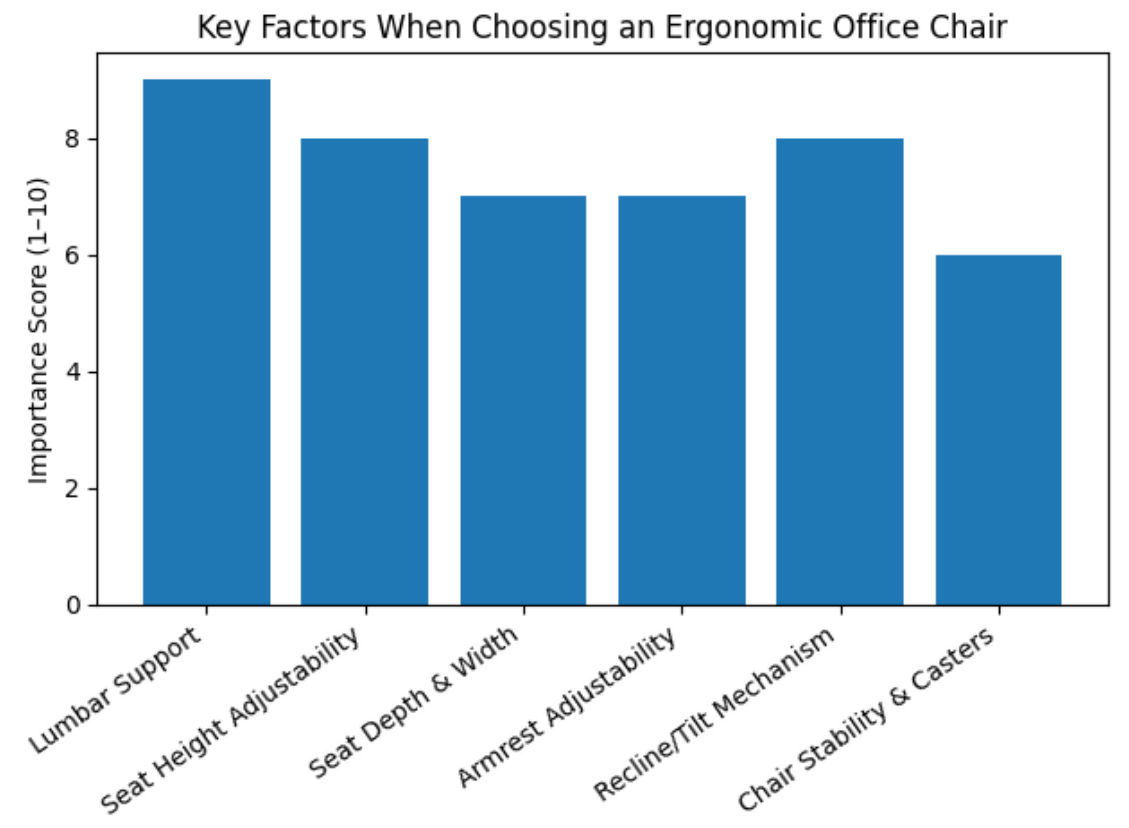
Choosing an ergonomic office chair begins with understanding its core functional components. These elements determine how effectively the chair supports posture, movement, and comfort throughout the workday. A chair may look visually appealing, but without the right structural features it will not deliver true ergonomic performance.
Feature | Function | Ergonomic Benefit |
Seat Height Adjustment | Adjusts vertical position | Keeps feet flat on floor |
Lumbar Support | Supports lower spine | Maintains natural back curve |
Seat Depth Adjustment | Moves seat forward/back | Prevents knee pressure |
Adjustable Armrests | Supports forearms | Reduces shoulder tension |
Tilt / Recline System | Enables movement | Reduces spinal pressure |
Five-Point Base | Stabilizes chair | Prevents tipping |
Each of these features contributes to a balanced sitting posture and improved comfort during extended desk work.
Seat height is one of the most basic yet essential adjustments in an office chair. When the seat is too high, the user’s feet may not rest flat on the floor. This position creates pressure beneath the thighs and restricts circulation in the legs. Conversely, when the seat is too low, the knees rise above hip level, causing additional strain on the lower back.
An ergonomic chair typically offers pneumatic height adjustment, allowing users to change seat height while sitting. Ideally, both feet should rest flat on the floor while the thighs remain parallel to the ground. Maintaining this alignment helps distribute body weight evenly and encourages a neutral sitting posture during long work sessions.
The lumbar region forms the inward curve of the lower spine. Without proper support, this curve collapses when sitting, leading to slouching and fatigue. A high-quality ergonomic office chair includes lumbar support designed to maintain this natural curvature.
Advanced chairs allow both vertical and depth adjustment of the lumbar support. Vertical adjustment ensures the support aligns with the user’s lower back, while depth adjustment controls how strongly it presses against the spine. These adjustments help accommodate different body shapes and sitting preferences.
When the lumbar support fits correctly, users can sit fully back against the chair without feeling pressure or discomfort. This alignment significantly reduces fatigue during long working hours and supports a healthier sitting posture.
Seat dimensions directly affect comfort and circulation. If the seat is too deep, the front edge may press against the back of the knees. This pressure restricts blood flow and causes discomfort after prolonged sitting. On the other hand, if the seat is too shallow, the thighs lack sufficient support and body weight concentrates on the hips.
A properly designed office chair provides adequate seat depth while leaving a small gap between the seat edge and the back of the knees. This gap typically measures two to four inches. At the same time, the seat should be wide enough to accommodate the hips comfortably without restricting movement.
Adjustable seat depth becomes especially useful in shared office environments where different users may need to modify the seating position to suit their body proportions.
Armrests support the natural weight of the arms during desk work. Without arm support, this weight transfers to the shoulders and neck, causing muscle tension. Over long working hours, unsupported arms contribute to fatigue and poor posture.
An ergonomic office chair typically includes adjustable armrests that move vertically and sometimes horizontally. Proper adjustment allows the forearms to rest naturally while the shoulders remain relaxed. This positioning reduces strain in the upper back and improves comfort during typing or mouse use.
Armrests should support the arms without lifting the shoulders or pushing the elbows outward. When properly adjusted, they help maintain a neutral sitting posture throughout the workday.
Human bodies are not designed to remain in a single rigid posture for extended periods. Small movements throughout the day help reduce muscle tension and spinal pressure. For this reason, many ergonomic chairs include tilt or recline mechanisms that allow controlled movement.
A reclining office chair distributes body weight more evenly across the backrest rather than concentrating pressure in the lower spine. Research indicates that a slight recline angle between 110° and 120° can reduce spinal compression compared with completely upright sitting.
Tilt tension adjustment allows users to control how easily the chair reclines. When the tension matches body weight, the chair supports natural movement without feeling unstable.
Mobility is an important factor in daily office activity. Workers often turn toward different monitors, reach for documents, or move across short distances within their workspace. A stable base ensures these movements remain safe and effortless.
Most ergonomic office chair designs include a five-point base that distributes weight evenly and improves stability. Casters attached to the base allow the chair to move smoothly across the floor.
Floor Type | Recommended Casters |
Hardwood | Soft polyurethane casters |
Carpet | Durable nylon casters |
Tile | Rubber or PU wheels |
Selecting the right wheels helps protect flooring and ensures smooth movement during daily use.
Not every ergonomic chair fits every user. Body height, leg length, torso proportions, and weight all influence seating comfort. Selecting the correct office chair therefore requires considering how the chair’s dimensions match the user’s physical characteristics.
Proper fit ensures the ergonomic features actually function as intended. Even the most advanced chair will fail to provide support if its size or adjustment range does not match the user.
User Height | Suggested Seat Height Range |
Under 5'2" | 15–18 inches |
5'3" – 6'0" | 16–21 inches |
Over 6'1" | 18–23 inches |
Chairs designed for taller individuals often include extended backrests and deeper seats. Conversely, chairs for shorter users may feature reduced seat depth to ensure proper leg positioning.
Seat dimensions influence how the body distributes weight during sitting. A properly fitted office chair supports most of the upper legs without pressing against the knees. If the seat pan is too deep, users cannot sit fully back against the lumbar support. If it is too shallow, thigh support becomes inadequate.
The width of the seat should also match the user’s body frame. Wider users benefit from seats that provide additional lateral space, while smaller users may prefer more compact designs that offer better stability.
Weight capacity is another important consideration when selecting a durable office chair. Standard models typically support around 250 pounds, while heavy-duty designs may support 300 pounds or more. Higher weight capacity usually indicates stronger internal components and reinforced frames.
Stronger chair bases, thicker steel frames, and larger seat pans contribute to long-term durability. For organizations purchasing chairs in bulk, choosing models with higher weight capacity often ensures longer service life.
Everyone’s spinal curvature differs slightly. Adjustable lumbar systems help accommodate these variations. When seated fully back in an office chair, the lumbar support should press gently against the lower back without feeling intrusive.
If the support sits too high, it may push against the mid-back. If positioned too low, it fails to maintain the spinal curve. Chairs that allow vertical lumbar adjustment provide greater flexibility for different users.
Choosing the right office chair requires more than comfort alone. A well-designed chair must fit the body, support posture, and provide reliable adjustments that reduce fatigue during long working hours.
Features such as adjustable lumbar support, proper seat dimensions, and flexible tilt mechanisms help maintain healthy sitting habits. These elements improve comfort, support productivity, and reduce long-term strain.
OK-BUY provides ergonomic office chair solutions designed for durability and comfort. Their products focus on reliable support, practical adjustments, and consistent quality, helping businesses and individuals create healthier and more efficient workspaces.
An ergonomic office chair supports posture, adjusts height, and reduces back strain during long desk work.
Choose an office chair with adjustable height, seat depth, and lumbar support that fits your body.
Lumbar support in an office chair keeps the spine aligned and prevents lower back pain.
Yes. A quality office chair improves comfort, posture, and productivity over long work hours.
Adjust the office chair so feet stay flat, knees level, and lumbar support fits your lower back.
